
Boom vs Tella: The AI Auto-Editing and Summary Comparison for Screen Recordings
Sara
Author
Introduction
Boom and Tella are both AI screen recorders, but they solve different problems. Boom is a free AI screen recorder that automatically edits, transcribes, summarizes, and dubs your screen recordings so you can share them async. Tella is a video editing studio built to turn recordings into polished content like YouTube videos, product demos, and online courses.
If you are searching for an AI tool that auto-edits screen recordings, or the best screen recorder with AI summaries, this Boom vs Tella comparison breaks down where each one wins. The short version: pick Tella when you are producing a polished video, and pick Boom when you want to record, auto-edit, summarize, and send in seconds. Boom is also a free Tella alternative, with no credit card needed to start.
Boom vs Tella in short
- Best AI screen recorder for hands-off auto-editing: Boom
- Best screen recorder with AI summaries and auto-generated tasks: Boom
- Best for polished, audience-facing video production and 4K export: Tella
- Best free Tella alternative: Boom
What is Boom?
Boom is a free AI screen recorder and async video tool. You record your screen and mic in one click, and Boom automatically removes pauses and dead air from your recording, generates a searchable transcript and an AI summary, adds auto-captions, and can dub your video into 50+ languages. Then it gives you an instant shareable link the moment you stop recording. Boom is built for async video communication across remote and distributed teams.
What is Tella?
Tella is an AI screen recorder and video editor built for creating polished content like product demos, tutorials, and online courses. Its AI auto-cuts filler words and silences, and you can edit the video by editing the transcript, then add transitions, layouts, and backgrounds and export in up to 4K at 60fps.
Which AI tools auto-edit screen recordings?
Both Boom and Tella automatically edit screen recordings, so AI auto-editing is table stakes for either tool.
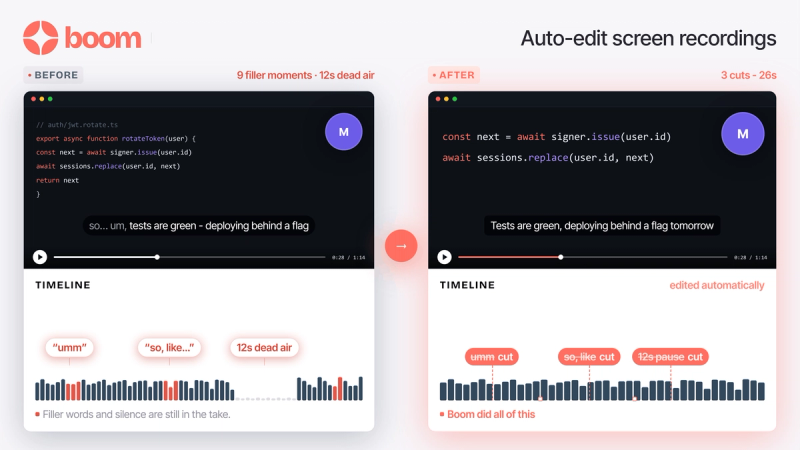
- Boom automatically removes pauses and dead air from your recording with no timeline to learn. You record, stop, and the clean version is ready to share instantly.
- Tella uses AI auto-cut to remove filler words and silences, lets you trim further by deleting words in the transcript, then layer on transitions and layouts by hand.
The difference is how much you have to do after. Boom handles the cleanup and hands you a shareable link. Tella gives you more manual controls to polish the result. If you are sending a quick async update, Boom gets you there faster. If you are producing a finished video, Tella gives you more to work with. For a wider view of the category, see our roundup of the best screen recording software tools.
What is the best screen recorder with AI summaries?
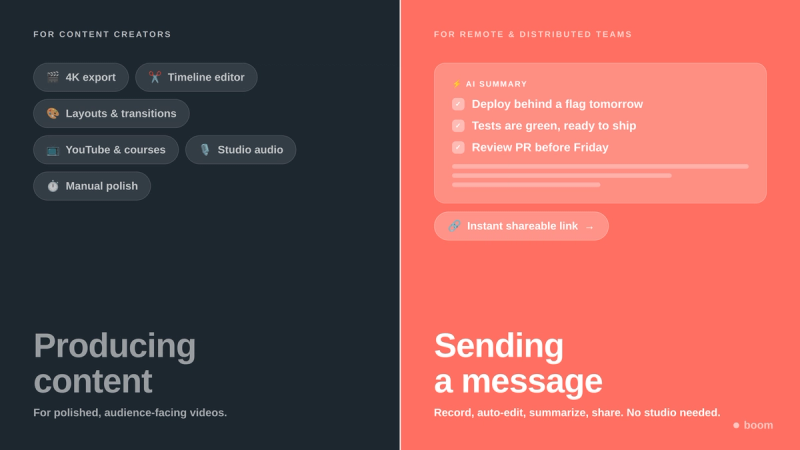
Boom is the best screen recorder with AI summaries. After every recording, Boom turns your video into a searchable transcript, an AI summary that pulls out the key takeaways, and auto-generated tasks. Tella's AI is focused on editing the video, not summarizing it, so it does not generate summaries or task lists from your recordings.
This is the clearest difference between the two. Tella hands you a video. Boom hands you a video plus a recap your team can read in seconds, which is what makes it useful for async product updates and status reports.
With a plain recording
- Send a 6 minute video
- Hope people watch the whole thing
- Re-explain the parts they missed
- No record of the action items
With Boom
- Send the video plus an AI summary
- People skim the recap in seconds
- Watch the clip only if they need the details
- Tasks are pulled out automatically
Captions, transcripts, and voice dubbing
Both tools generate captions and transcripts. The difference is dubbing.
- Tella transcribes and captions in a wide range of languages so viewers can read along, while your original audio stays the same.
- Boom adds AI voice dubbing in 50+ languages, re-voicing your message so a teammate in another country hears it in their own language. For distributed teams, that turns one recording into a video everyone understands. It is one of the async video features freelancers and teams lean on to work across time zones.
Export quality and speed to share
Tella is built for high-end output, exporting up to 4K at 60fps, which suits polished content for YouTube or a course.
Boom is built for speed to share. Your video uploads while you record, so a clean, captioned link is ready the moment you stop, with no render wait. When the goal is to reduce unnecessary meetings and send an update fast, time to a shareable link matters more than 4K.
Who should use Boom, and who should use Tella?
Use Tella if you are producing content for an audience: YouTube videos, online courses, and polished product marketing, where transitions, layouts, backgrounds, and 4K export earn their keep.
Use Boom if you are communicating with people: product demos, tutorials, onboarding, and async updates, where being understood quickly matters more than production polish. Boom is the better fit when you would rather record and send than record and edit, and it works as a free Tella alternative for teams that do not need a full editing studio.
Boom vs Tella comparison table
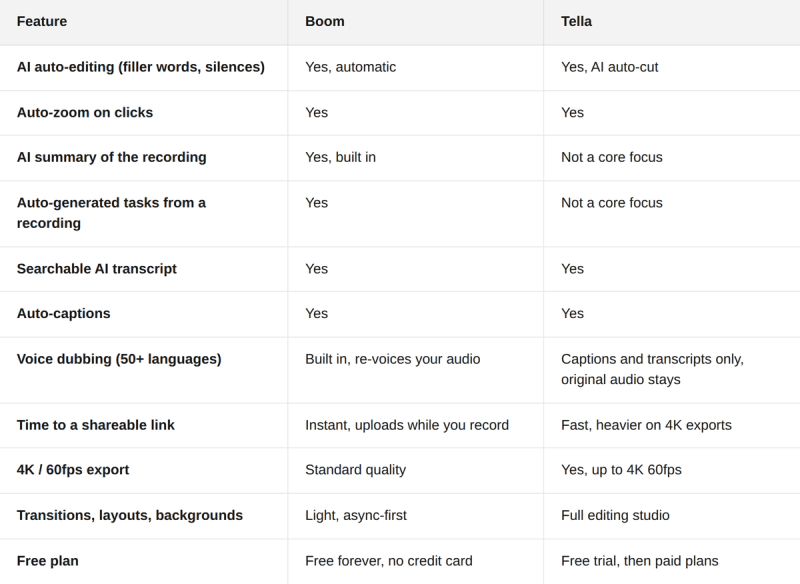
The pattern is clear. Tella is the stronger editing studio if polish and export quality are the job. Boom is the stronger AI screen recorder if being understood quickly is the job, and it is free to start.
Frequently asked questions
Is Boom a good Tella alternative?
Yes. Boom is a free Tella alternative for teams that want to record, auto-edit, summarize, and share screen recordings without a full editing studio. It includes AI auto-editing, transcripts, AI summaries, and voice dubbing at no cost.
Which AI screen recorder auto-edits recordings automatically?
Both Boom and Tella auto-edit. Boom does it hands-off with no timeline, automatically removing pauses and dead air so the clean version is ready the moment you stop recording. You can also trim and edit manually if needed. Tella offers AI auto-cut plus a fuller manual editor with transitions, layouts, and backgrounds for more production control.
What is the best screen recorder with AI summaries?
Boom. It generates a searchable transcript, an AI summary of the key points, and auto-generated tasks from each recording. Tella focuses on editing the video rather than summarizing it.
Can Tella dub videos into other languages?
Tella transcribes and captions in many languages but keeps your original audio. Boom adds AI voice dubbing in 50+ languages, so viewers hear your message in their own language instead of just reading subtitles.
Is Boom free?
Yes. Boom is free to start with no credit card. The AI features are included, and the desktop app offers unlimited recording.
Does Tella export in 4K?
Yes. Tella exports up to 4K at 60fps, which is a strength for polished, audience-facing content.
Skip the edit, send the message
If you are choosing between Boom and Tella, it comes down to one thing: do you want to produce a video, or do you want to be understood. Tella is a strong studio for the first. Boom is the AI screen recorder built for the second, recording, auto-editing, summarizing, and dubbing so you can share an update without adding a meeting.
Record once, let AI clean it up and summarize it, send a link. Skip the meeting, send a Boom.

Related readings
- 7 Best Recording Software Tools for Students and Creators
- Top Async Video Features for Freelancers
- The Complete Guide to Async Video Communication