
Boom vs Loom for HR: The Best Async Video Alternative for Onboarding, Policy Updates, and Internal Training
Sara
Author
Introduction
HR spends hours repeating conversations that could be shared once: onboarding welcomes, policy updates, recruiter handoffs, hiring manager notes. The work is not hard to explain. It just gets expensive when you have to explain it live every time.
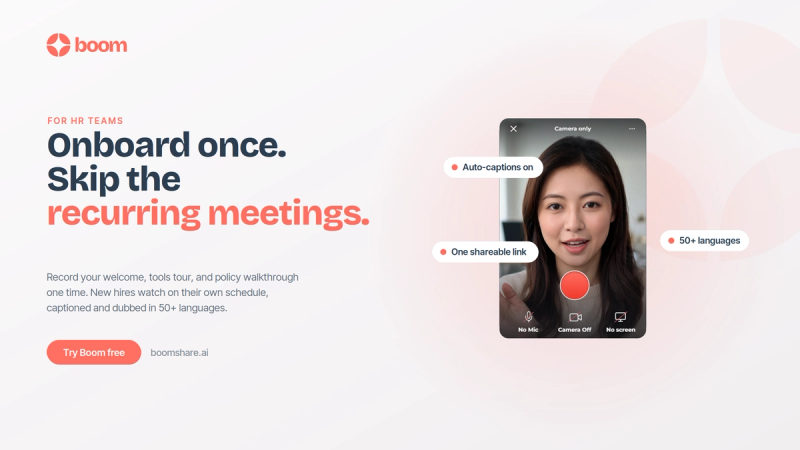
Boom is a free AI screen recorder that turns those repeat conversations into clear async video updates. Record your update once. Boom edits it, adds captions, translates it, and turns it into a link your team can watch on their own time. No extra meeting needed. Just send a Boom.
Looking for a Loom alternative built for HR? The right choice depends on how your team actually works. For onboarding, policy walkthroughs, recruiting handoffs, and manager updates, Boom helps HR teams record once, share clearly, and keep everyone aligned across time zones.
Why HR teams look for a Loom alternative
HR work is full of repeatable communication. New hire onboarding, policy changes, interview handoffs, manager updates. All of it needs to be clear, consistent, and easy to revisit later.
Loom is a familiar tool for quick async video messages. But for many HR teams, the challenge starts after the recording is done. The video still needs to be easy to follow, accessible, and useful for people across different teams, locations, and languages.
That is where Boom is built differently. Boom helps HR teams clean up recordings with AI pause removal, automatic captions, transcription, and translation. Choose the language, share the link, and your message becomes easier to watch and understand across the team.
For HR, the goal is not just to record a message. It is to help employees understand it, come back to it later, and act on it without needing another meeting.
The HR comms workflow, before and after
Before
- Repeating the same onboarding walkthrough on every new hire call
- Answering the same policy questions across Slack, email, and meetings
- Losing context between recruiters, hiring managers, and interview panels
- Booking another sync every time something needs a clearer explanation
After
- Record onboarding once and reuse it
- Share captioned policy updates on demand
- Keep hiring teams aligned with recorded handoffs
- Use AI captions, transcripts, and translations
- Reserve meetings for real discussions
Onboarding videos that help new hires ramp faster
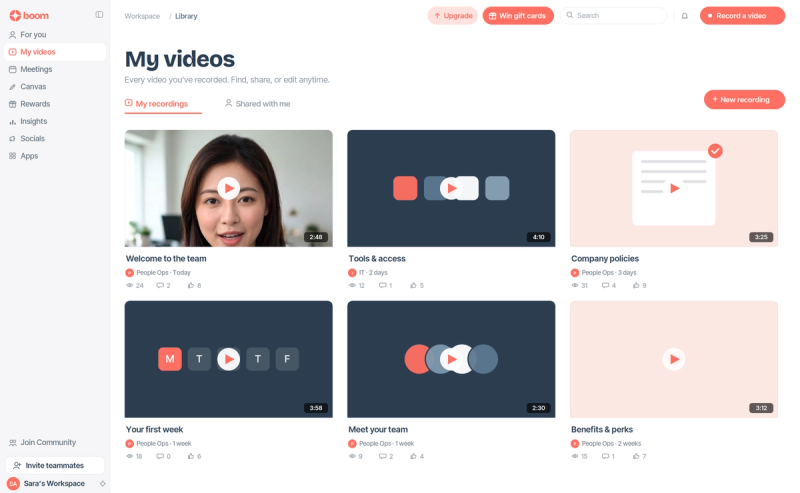
Onboarding is one of the strongest HR use cases for async video. Instead of repeating the same welcome message, tools walkthrough, and first-week guidance on every call, HR teams can build a simple onboarding video library that new hires can watch whenever they need it.
With Boom, you can create onboarding videos for:
- Welcome messages from HR and leadership
- Company culture and team introductions
- Tools, access, and security walkthroughs
- Role-specific training and SOPs
- First-week expectations and check-in rhythms
This is especially useful for distributed teams. New hires can review the material at their own pace, while automatic captions, transcription, AI pause removal, and translation help make the same onboarding videos easier to follow.
Policy walkthroughs that cut the back-and-forth
Policy updates are another place HR loses time. When something changes, people ask the same questions across Slack, email, and meetings until everyone is aligned.
A short Boom video walks people through what changed, why it matters, and where the written policy lives. That is easier to absorb than a long thread, and it gives employees something they can come back to later. Common HR policy walkthroughs include:
- PTO and leave changes
- Benefits enrollment reminders
- Code of conduct updates
- Security and compliance refreshers
- Remote work or meeting norm changes
With AI pause removal, automatic captions, transcription, and translation, Boom helps policy videos stay clear, concise, and easy to follow across different teams.
Recruiting handoffs that keep hiring teams aligned
Recruiting handoffs often slow down when important context gets lost between recruiters, hiring managers, and interviewers. A short async video helps keep everyone on the same page by giving the hiring team one clear summary they can watch before the next step. Boom works well for:
- Candidate profile summaries
- Interview debriefs
- Hiring manager handoffs
- Updated scorecard expectations
- Next-step reminders for interview panels
Instead of booking another sync, a recruiter can record a quick update, share the link, and keep the hiring process moving. The team gets the context they need, and there is a clear record of what was shared.
Manager communication and internal knowledge sharing
HR also helps managers communicate important updates clearly across teams and departments. When a message needs tone, context, or a more personal explanation, a short video can be easier to understand than a long email.
Boom works well for manager communication like:
- Team-wide reminders
- Performance cycle guidance
- Benefits or policy announcements
- Change management updates
- Answers to recurring HR questions
The bigger win is building a simple internal HR knowledge library over time. Instead of answering the same question live again and again, HR can record the answer once and keep it available for managers and employees to revisit later. That means fewer repeated explanations, less meeting load, and communication that still feels clear and human.
Boom vs Loom, ScreenPal, and VEED
For HR teams comparing Loom alternatives, the features that matter most are the ones that make communication easier to understand and easier to reuse.
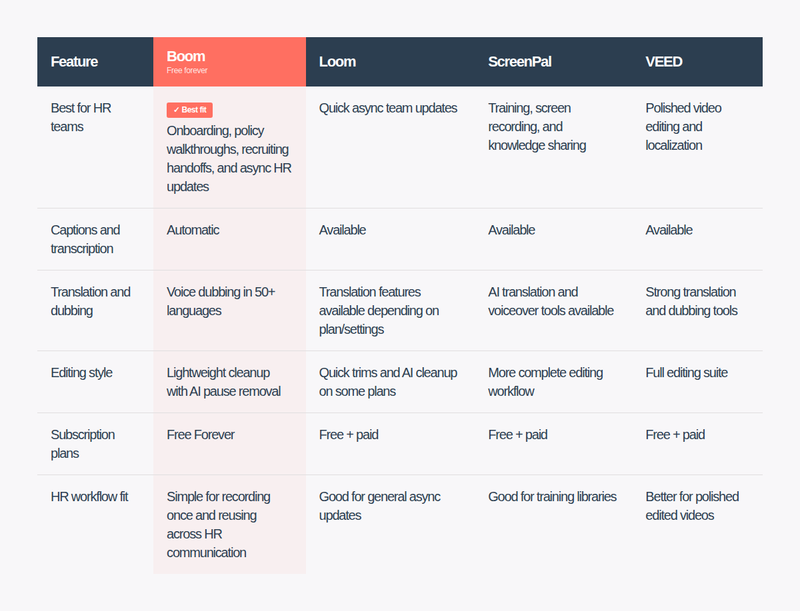
For HR teams, the right tool depends on how you work. Loom handles quick internal updates well, ScreenPal suits training and knowledge libraries, and VEED works when you need heavier editing and localization. Boom fits best when HR wants to record onboarding walkthroughs, policy updates, and recruiting handoffs once and share them across the team without scheduling a single meeting. And unlike the rest, Boom is free forever.
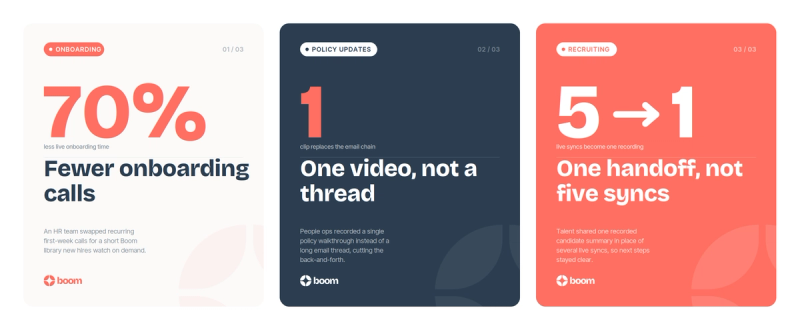
Three HR teams, three wins
Onboarding videos: Record welcome messages, tools walkthroughs, and first-week guidance once so new hires can ramp without another live call.
Policy walkthroughs: Turn policy changes into one clear Boom video employees can revisit instead of searching through Slack or email.
Recruiting handoffs: Share candidate summaries and interview context in a quick async video so hiring teams stay aligned without another sync.
Bring your HR comms into one place
If your HR team is looking for a Loom alternative built around onboarding, policy walkthroughs, recruiting handoffs, and manager communication, Boom gives you a simple way to record once and share clearly.
With AI pause removal, automatic captions, transcription, translation, and voice dubbing, HR updates become easier to watch, revisit, and understand across teams.
Record once. Share anywhere. Keep everyone aligned without adding another meeting.
Related readings
- The Complete Guide to Async Video Communication
- How to Create Async Videos for Teams and Creators