
Reduce Meeting Load for Engineering Teams with Async Video
Sara
Author
Introduction
Engineering teams do their best work when they have time to build, debug, review, and ship. But recurring standups, status syncs, and cross-functional check-ins can become a steady drain on focus.
Boom helps distributed engineering teams 2026 replace those meetings with async video updates. Engineers can record once, let Boom auto-edit the recording, and share a clear update that teammates can watch on their own schedule.
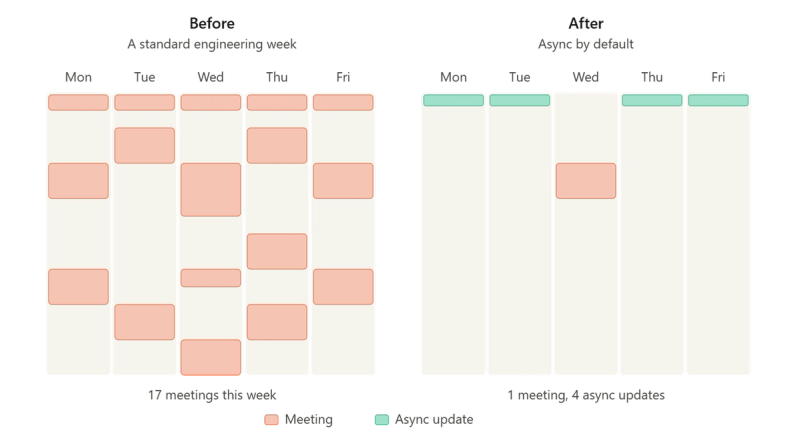
Why do engineering teams need a meeting reduction workflow?
Recurring meetings often exist because teams need visibility, alignment, and fast answers. The problem is that the same update gets repeated across standups, Slack threads, and follow-up calls.
For engineering teams, that repetition creates friction. It breaks deep work, slows handoffs, and makes it harder for distributed teammates to stay in sync across time zones.
An async workflow gives teams a better default: record the update once, share it, and let the right people review it when they are ready. That keeps communication moving without forcing everyone into the same calendar block.
Before and after: the engineering update workflow
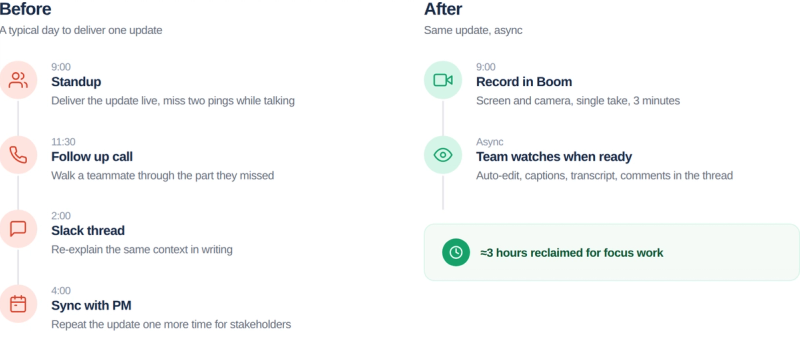
Before
- Join a recurring standup or sync
- Repeat the same progress update live
- Pause for questions and side discussions
- Schedule follow-up meetings for missing context
After
- Record the update once in Boom
- Let Boom auto-edit the recording
- Add captions and share the link
- Replace the meeting with an async review and comments
This is the shift that matters for engineering teams: less calendar coordination, more time for actual engineering work.
How Boom supports async engineering communication
Boom is a free AI screen recorder and video editor with auto-edits, captions, and 50+ language voice dubbing. For engineering teams, that means the update is not just recorded. It is packaged in a way that is easier to consume asynchronously.
Use Boom for:
- Daily engineering status updates
- Blocker walkthroughs
- Release notes for product and support teams
- Incident summaries
- Handoff videos between time zones
- Architecture explanations that do not need a live meeting
The practical benefit is simple. When the update is clear enough to watch later, the team does not need to gather live just to hear it once.
5 step implementation playbook
A meeting reduction rollout works best when it is simple and repeatable. Start with one recurring sync, replace it with a clear async format, and expand from there.
1. Pick one recurring meeting to kill first
Choose the standup, weekly status sync, or project check-in that repeats the same information most often. Start where the time savings will be easiest to see.
2. Define the update format
Keep the structure consistent so teammates know what to expect. A good engineering update usually covers what changed, what is blocked, and what needs attention.
3. Record the update in Boom
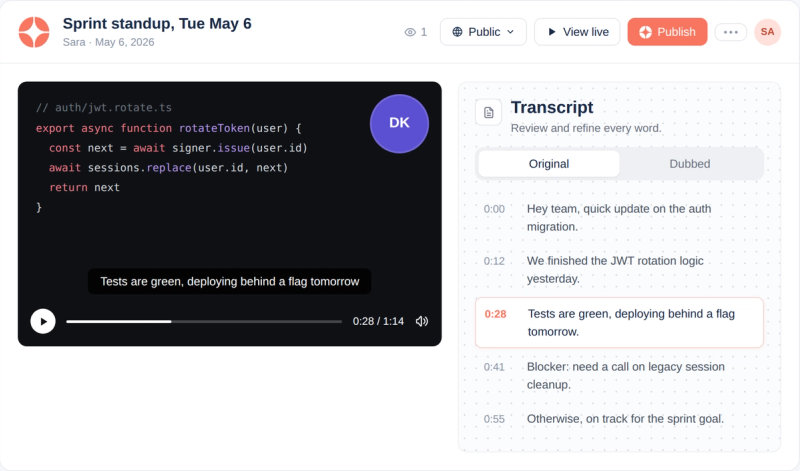
Have the engineer record the screen, voice, and any relevant context in one take. The goal is to capture the update once instead of re-explaining it live.
4. Let Boom auto-edit and caption it
Use Boom’s auto-editing to make the update cleaner and easier to watch. Captions help teammates review faster and reduce the need for clarification calls.
5. Move the live meeting to decisions only
Share the link in Slack, email, or your team workspace. Ask teammates to respond in the thread with questions or approvals. If a live discussion is still needed, reserve it for the few updates that actually require real-time debate.
This playbook works best when the team treats async as the default and meetings as the exception.
Boom vs Loom, Tella, and Clips by ClickUp
For engineering teams choosing an async video tool specifically to reduce meeting load, the comparison comes down to three things: how well the tool replaces recurring meetings, how easy passive capture is, and how naturally async updates fit into existing engineering workflows.
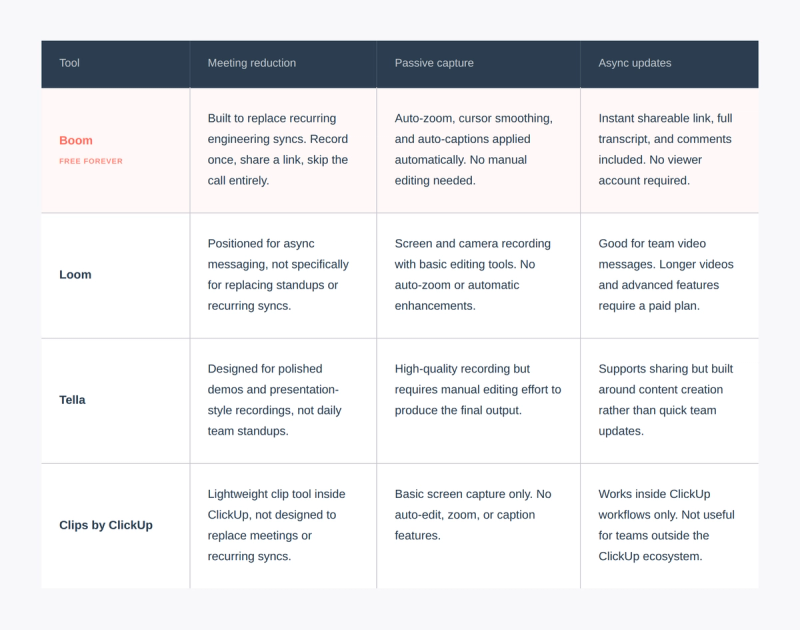
If you're trying to cut recurring engineering syncs, Boom is the most direct tool for that. Loom works better for general team communication. Tella is built for polished, high-production recordings rather than daily updates. Clips by ClickUp is a good fit if your team is already inside ClickUp and just needs quick captures.
When to use async video instead of another meeting
Most engineering updates don't actually need a meeting. Sprint progress, bug repos, release notes, architecture decisions, onboarding walkthroughs, all of these are things one person knows, and the rest of the team needs to absorb. That's a recording, not a calendar invite.
Keep meetings for the moments that actually need real-time energy: a hard decision, a heated debate, two people pairing through something tricky. Everything else should default to async.
That's what Boom is for. Record it once, post the link, let the team catch up when they're ready. Nothing fancy, no new workflow to learn. Just fewer meetings and more time to actually build.
Get your engineering team out of recurring syncs
Engineering teams in 2026 don't need another meeting format. They need a way to communicate that respects deep work and time zones at the same time.
Boom gives engineering teams the async video layer that replaces standups, status syncs, and check-ins with one recorded update the whole team can watch on their own time. Less calendar load, more focus time, clearer communication.

Related readings
- The Complete Guide to Async Video Communication
- How to Create Async Videos for Teams and Creators